Shopify Checkout Optimization: Where Most Stores Lose Sales
You’re driving traffic, your product pages look good, and people are adding to cart. Then somewhere between “Add to Cart” and “Thank you for your order,” they disappear.
This is the most expensive problem in ecommerce - and on Shopify specifically, there are a handful of checkout mistakes that account for most of the lost revenue. The good news is they’re fixable. The bad news is most stores don’t realize they have them.
The Shopify Checkout Is Good - Until You Break It
Shopify’s default checkout is actually pretty well optimized out of the box. It’s fast, it’s mobile-friendly, and it supports the major payment methods. Shopify has spent years testing and refining it.
The problem is what store owners do to it - or fail to do with it.
Most of the checkout issues we see aren’t because Shopify gave you a bad checkout. They’re because something upstream is creating friction, or because simple settings were never configured properly.
The Mistakes That Actually Cost You Money
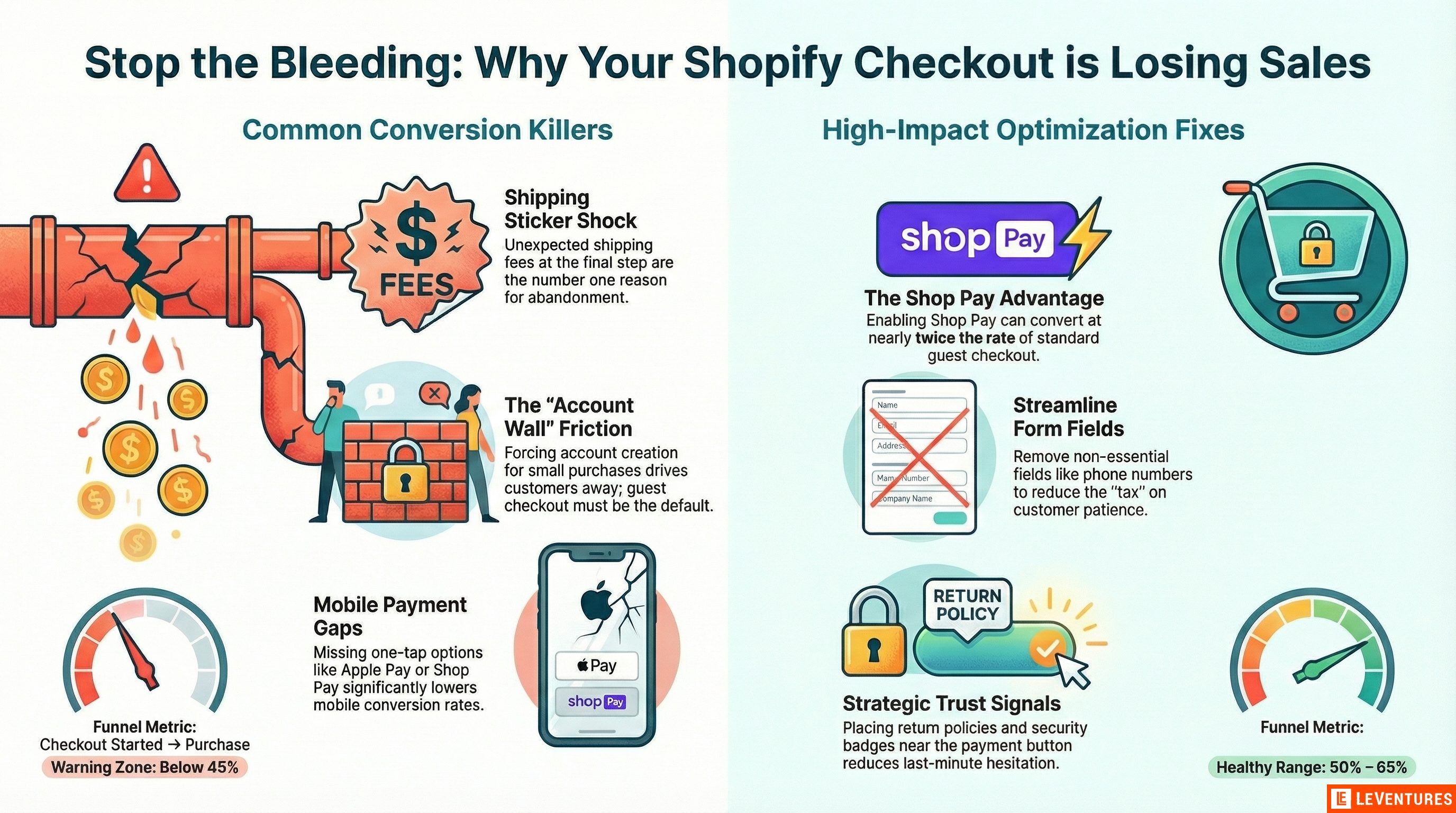
Surprise shipping costs.
This is still the number one reason people abandon checkout. They add a product, click through to checkout, and suddenly there’s a $12 shipping fee they didn’t expect. They leave.
The fix isn’t free shipping (though that helps). The fix is showing shipping costs earlier. Put estimated shipping on your product pages. If you offer free shipping over a threshold, make that obvious everywhere - on the product page, in the cart, in the announcement bar. By the time someone reaches checkout, the shipping cost should not be new information.
Forcing account creation.
Shopify lets customers check out as guests. If you’ve turned that off or made it confusing, you’re losing sales. Nobody wants to create an account to buy a $35 product. Guest checkout should be the default path, with an option to create an account after the purchase is complete.
Check this in your Shopify admin under Settings > Checkout. The option should be set to allow guest checkout. This sounds basic, but we’ve seen stores with this misconfigured more times than you’d expect.
Not enough payment options.
Credit cards are not enough anymore. On mobile especially, people want to pay with Apple Pay, Google Pay, or Shop Pay - methods where they tap a button and they’re done. No typing card numbers on a phone screen.
Shopify makes this easy. Shop Pay, Apple Pay, Google Pay, and PayPal can all be enabled in your payment settings. If you’re not offering at least three of these, you’re losing mobile conversions. Shop Pay in particular has a significantly higher checkout completion rate than standard checkout because it saves the customer’s information across all Shopify stores.
Too many form fields.
Every field you add to checkout is a small tax on the customer’s patience. Do you really need a phone number? A company name? A separate billing address by default?
Strip checkout down to what you actually need. On Shopify, go to Settings > Checkout and look at the optional fields. Anything that isn’t required for fulfillment should be optional or removed. Phone number fields alone cause a measurable drop in completion rate on some stores - people don’t want to give their number to a brand they just found.
No trust signals at checkout.
Your customer is about to hand you their credit card number. They need to feel confident doing that. If your checkout page has no security badges, no return policy mention, and no indication that this is a legitimate business, some people will hesitate.
Add a brief line about your return or satisfaction guarantee near the payment form. Display accepted payment method icons. If you have notable press mentions or a large customer base, a small line like “Trusted by 50,000+ customers” near the checkout button goes a long way. Shopify Plus stores can customize the checkout more extensively, but even on standard plans you can add policy links and trust messaging.
The Cart Page Problem
Before anyone even reaches checkout, they hit the cart page. And on many Shopify stores, the cart page is where the real bleeding happens.
Common cart page issues:
- No clear path forward. The checkout button should be the most visible element on the page. If it’s the same visual weight as “Continue Shopping,” you’re splitting attention.
- No order summary clarity. People want to confirm what they’re buying. Show product images, variant details, and line item prices clearly.
- No urgency or reassurance. A simple “Free shipping on orders over $75 - you’re $12 away” message can increase average order value and push people into checkout instead of back to browsing.
- Discount code fields that create doubt. If you show a prominent discount code field, customers without a code will leave to go search for one. Either make the field less prominent or consider auto-applying discounts where possible.
Shopify-Specific CRO Moves
Beyond fixing mistakes, there are a few Shopify-specific optimizations worth doing.
Enable Shop Pay. If you haven’t already, turn it on. Shopify’s own data shows that Shop Pay converts at nearly twice the rate of standard guest checkout. It works because returning customers can check out in one tap - their address and payment info is already saved.
Use Shopify’s built-in abandoned checkout emails. Under Settings > Checkout, you can enable automatic emails to customers who start checkout but don’t finish. The default email is decent, but customize it - add the product image, mention your return policy, and consider a small incentive for first-time buyers. These emails recover real revenue with almost no ongoing effort.
Speed matters at checkout too. Heavy apps that load scripts on every page - including checkout - slow things down. Audit your installed apps and remove anything you’re not actively using. Every extra script adds load time, and at checkout, even a one-second delay increases abandonment.
Test your own checkout regularly. Once a quarter, go through your entire purchase flow on your phone. Add a product, go to cart, go through checkout. Do it on a slow connection. You’ll find things that analytics won’t tell you - a confusing layout, a field that doesn’t autofill correctly, a trust badge that’s broken on mobile.
How to Measure What’s Working
Set up a funnel in GA4 that tracks:
- Product page views
- Add to cart
- Checkout started
- Purchase completed
The step from “checkout started” to “purchase completed” is your checkout conversion rate. On a healthy Shopify store, this should be somewhere between 50% and 65%. If you’re below 45%, you almost certainly have one of the problems listed above.
Track this number before and after you make changes. Don’t change five things at once - change one, measure for a couple of weeks, then move on. That way you know what actually moved the needle.
The Compounding Effect
Checkout optimization is one of the highest-leverage things you can do because it sits at the bottom of the funnel. A 10% improvement in checkout completion rate means 10% more revenue from the same traffic you’re already paying for. That improvement applies to every ad dollar, every email campaign, every organic visitor - permanently.
Most stores spend all their energy getting more people to the site. The ones that grow efficiently spend equal energy making sure the people who are already there can actually buy.
If you want to know where your Shopify checkout is losing sales, we’ll find it in the free audit. We look at your checkout flow, your cart page, your payment setup, and tell you exactly what to fix first.