Shopify Flow + Klaviyo: Automations Every Store Should Set Up
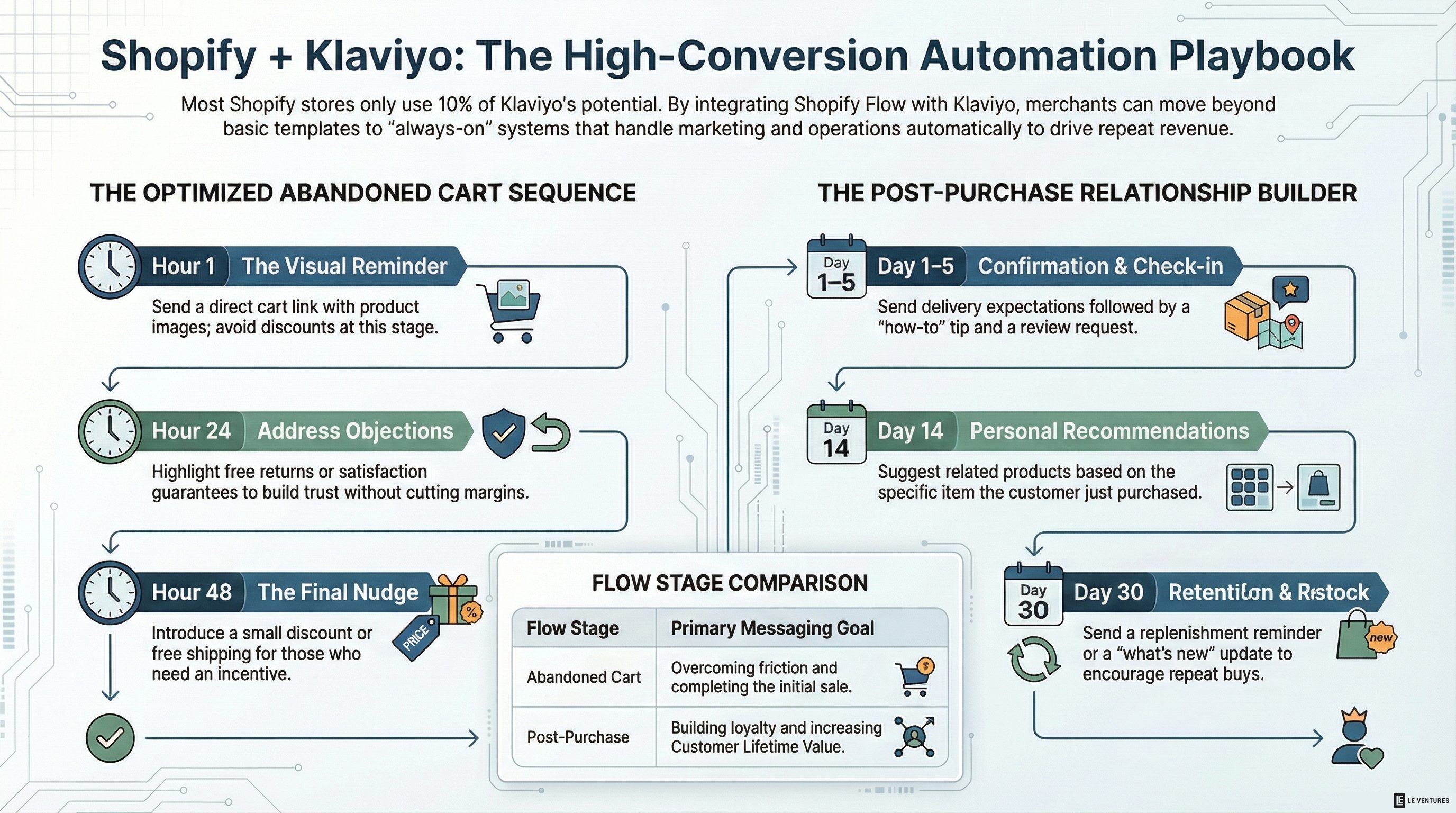
Most Shopify stores have Klaviyo installed. Most of them are using maybe 10% of what it can do.
They set up a welcome email, maybe an abandoned cart flow, and then never touch it again. Meanwhile, Shopify Flow - which is free on every Shopify plan - sits there doing nothing.
The combination of these two tools, connected properly, can automate a significant chunk of your marketing and operations. Not in a theoretical “wouldn’t it be nice” way. In a “this runs while you sleep and makes you money” way.
Here are the automations that are actually worth setting up.
Abandoned Cart - But Do It Right
Everyone knows about abandoned cart emails. Most stores have one. The problem is most stores have a bad one.
The default abandoned cart flow sends a single email a few hours after someone leaves items in their cart. That’s fine. It’s also the bare minimum.
A flow that actually performs looks more like this:
- Email 1 (1 hour after abandonment): Reminder with the product image and a direct link back to the cart. No discount. Just “you left this behind.”
- Email 2 (24 hours): Address the most common objection. If you offer free returns, say so. If you have a satisfaction guarantee, lead with it. Still no discount.
- Email 3 (48 hours): Now you can offer something - free shipping, a small discount, whatever makes sense for your margins. This is the email for people who need a nudge.
- SMS (4 hours, if you have consent): A short, direct text. “Still thinking about [product]? Your cart’s waiting.” SMS open rates crush email for this use case.
The key is the conditional logic. If someone purchases after Email 1, they shouldn’t get Email 2. If they’ve already used a discount code this month, maybe skip the offer in Email 3. Klaviyo handles this natively - you just have to set up the flow splits.
Post-Purchase Sequences
The sale is not the end of the funnel. It’s the middle.
A new customer who has a good post-purchase experience is dramatically more likely to buy again. A new customer who hears nothing from you after their order confirmation is just a one-time buyer.
Set up a post-purchase flow with at least these touchpoints:
- Day 1: Order confirmation with expected delivery timeline and what to expect. Keep it simple.
- Day 3-5 (after delivery): Check-in. “How’s [product]? Here’s a quick tip for getting the most out of it.” Include a link to leave a review.
- Day 14: Related product recommendation based on what they bought. Not a hard sell - a genuine suggestion. “People who got [product A] usually love [product B].”
- Day 30: If they haven’t bought again, a replenishment reminder (if applicable) or a “here’s what’s new” update.
This is where Shopify Flow adds value. You can trigger different Klaviyo flows based on what someone bought, how much they spent, or whether they’re a first-time or repeat buyer. A first-time customer buying a $30 item gets a different sequence than a repeat customer placing a $200 order.
VIP Segmentation
Not all customers are equal. The top 10% of your customers typically account for 30-50% of your revenue. Treat them differently.
Use Shopify Flow to tag customers based on lifetime spend thresholds. When someone crosses $500 in total purchases (or whatever makes sense for your brand), Shopify Flow tags them as a VIP in your customer record. Klaviyo picks up that tag and moves them into a VIP segment.
Now you can:
- Send VIP-only early access to new products
- Give them a dedicated discount tier
- Invite them to a loyalty program or referral program
- Send handwritten-style thank-you emails from the founder
The automation part is the tagging and segmentation. It happens in the background, no manual work. The VIP treatment itself can be as simple or elaborate as you want.
Win-Back Flows
A customer who bought once and hasn’t been back in 90 days is slipping away. At 180 days, they’re probably gone.
Set up a win-back flow that triggers based on last purchase date:
- 60 days since last purchase: Light touch. “We haven’t seen you in a while. Here’s what’s new.”
- 90 days: Stronger offer. A discount or free shipping to come back.
- 120 days: Last attempt. Make it clear this is the final outreach. “We don’t want to keep emailing if you’re not interested - but we’d love to have you back.”
After the final email, if they don’t engage, suppress them. Sending to unengaged contacts hurts your deliverability, which hurts your emails to everyone else.
Inventory and Back-in-Stock Alerts
This one is underrated. When a popular product goes out of stock, Shopify Flow can trigger a Klaviyo event that does two things:
- Sends an internal alert to your team so you know something popular just sold out.
- Enables a “Notify Me” signup on the product page so interested customers can opt in.
When the product is restocked, Shopify Flow detects the inventory change and triggers a Klaviyo flow to everyone on the waitlist. These emails get exceptional open and conversion rates because the intent is already there - they told you they wanted it.
Review Request Timing
Asking for a review at the right moment makes a huge difference. Too early and they haven’t used the product yet. Too late and they’ve moved on.
Use Shopify Flow to estimate delivery date based on shipping method and trigger the Klaviyo review request accordingly. Domestic orders get the review request 5 days after shipment. International orders get it at 14 days. The timing feels natural instead of arbitrary.
The Mistake Most Stores Make
The biggest mistake isn’t missing a specific automation - it’s setting these up once and forgetting them.
Your automations should be reviewed quarterly at minimum. Look at the open rates, click rates, and conversion rates for each flow. If Email 2 in your abandoned cart sequence has a 3% open rate, something is wrong with your subject line or your timing. If your post-purchase flow has great engagement but no repeat purchases, the product recommendations probably aren’t relevant.
The stores that get real results from automation are the ones that treat it like a living system - set it up, measure it, adjust it, repeat.
If you want help building out these flows or auditing the ones you already have, that’s exactly the kind of thing we dig into in the free audit. We’ll look at what’s running, what’s missing, and what’s underperforming.