Why Your Shopify Tracking Pixels Are Probably Broken
If you’re running ads to a Shopify store and haven’t touched your tracking setup since 2021, your pixels are almost certainly not working the way you think they are.
You might not even know it. The ads still run. The dashboards still show numbers. But those numbers are increasingly disconnected from reality - and that gap is costing you money every day you ignore it.
Here’s what happened, what it looks like when it’s broken, and what to do about it.
What iOS 14.5 Actually Broke
Before April 2021, Meta’s pixel could follow a person from an ad click through your Shopify store and back again. It knew who clicked, what they browsed, and whether they bought. That data fed the algorithm, which used it to find more people like your buyers.
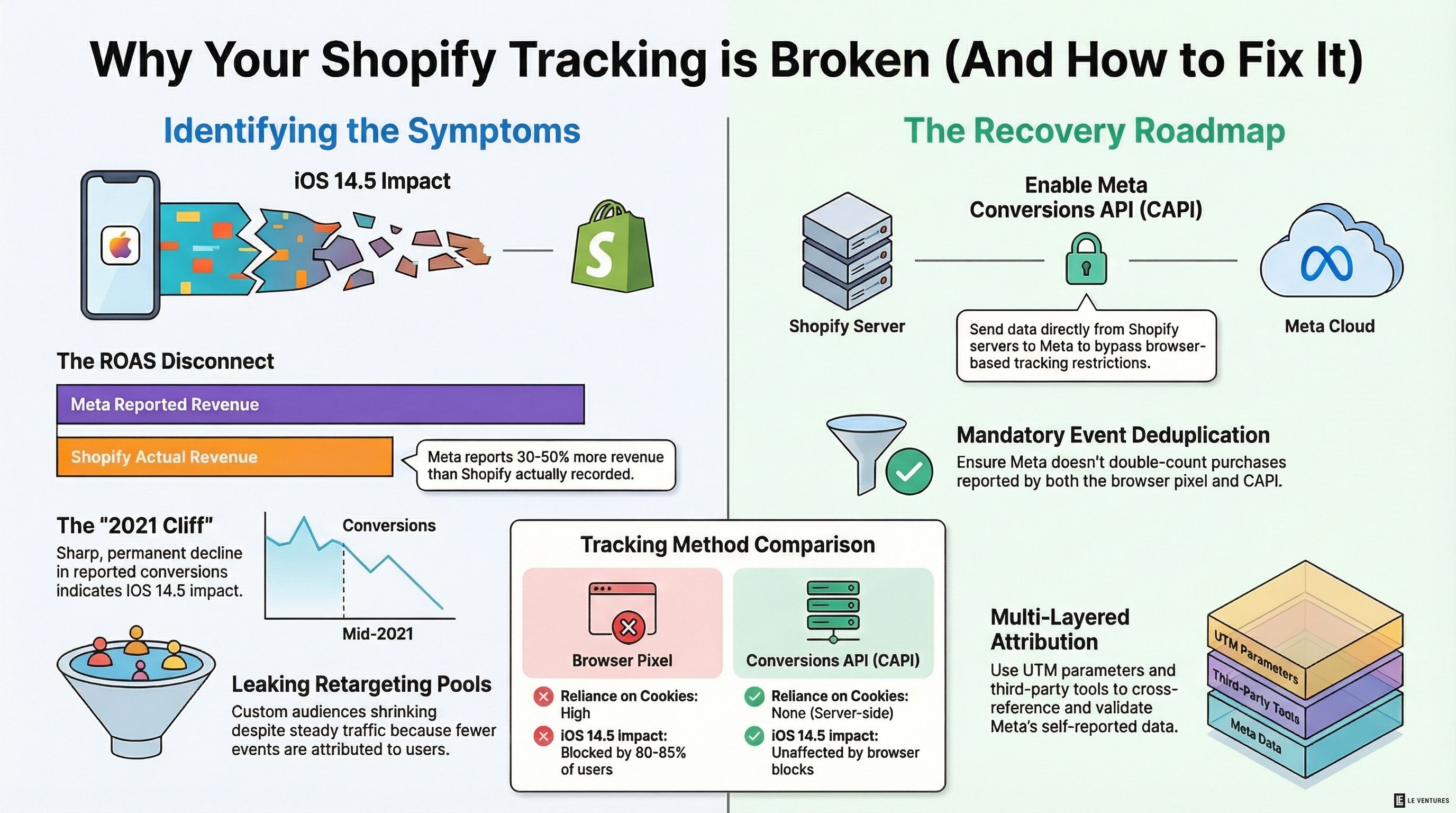
Then Apple shipped iOS 14.5 with App Tracking Transparency. Every app had to ask permission before tracking users across other apps and websites. Around 80-85% of iPhone users said no.
Overnight, Meta lost visibility into the majority of iOS purchase events. The pixel still fires on your site - but for most iPhone users, Meta can’t connect that fire back to the ad click that caused it.
This hit Shopify stores especially hard because Shopify’s customer base skews heavily toward mobile shoppers. On many Shopify stores, 70%+ of traffic comes from mobile devices, and a large chunk of that is iOS. So the platform where most of your customers are shopping is exactly the platform where tracking broke the most.
What Broken Pixels Look Like in Your Dashboards
The tricky part is that broken tracking doesn’t look like an error. It looks like bad performance. Here’s what to watch for:
Your Meta ROAS doesn’t match your actual revenue.
Meta says you made $50,000 from ads last month. Shopify says total revenue was $40,000. Those numbers will never match perfectly, but if Meta is consistently reporting 30-50% more revenue than you actually earned, your tracking is inflated - probably from modeled conversions filling in the gaps where real data is missing.
Your reported conversions dropped off a cliff in mid-2021 and never fully recovered.
Pull up your Meta purchase event history. If you see a sharp decline sometime between April and September 2021 that never bounced back to prior levels, that’s the iOS 14.5 impact - and it means you’ve been optimizing on incomplete data ever since.
Scaling winners doesn’t produce the results you expect.
You find a campaign showing 4x ROAS, so you double the budget. Revenue goes up, but not by 2x. Not even close. This often happens because the original ROAS number was inflated by modeled conversions. You’re scaling based on a number that was never real.
Your retargeting audiences are shrinking.
Custom audiences built from pixel data - website visitors, add-to-carts, past purchasers - are getting smaller even though your traffic is the same or growing. That’s because fewer events are being attributed to identifiable users. Your retargeting pool is leaking.
You can’t tell which creative is actually working.
If the pixel can’t accurately attribute purchases to specific ads, your creative testing is compromised. You might kill an ad that’s actually performing and scale one that isn’t - because the data you’re making decisions on is a guess.
What to Do About It
This is fixable. Not perfectly - you’re never getting back to pre-iOS 14 levels of tracking accuracy - but you can recover a significant portion of the signal you’ve lost.
Set up Meta Conversions API (CAPI) through Shopify.
This is the single most important fix. CAPI sends purchase and event data directly from Shopify’s servers to Meta, bypassing the browser entirely. It doesn’t rely on cookies or the pixel firing in the user’s browser, which means iOS restrictions don’t block it.
Shopify has a native Meta integration that handles this. Go to your Shopify admin, find the Meta & Instagram sales channel, and make sure the Conversions API toggle is enabled. If it’s already enabled, check the Meta Events Manager to confirm events are actually flowing through both the pixel and CAPI.
Deduplicate your events.
Once you have both the browser pixel and CAPI running, you need deduplication. Without it, Meta counts the same purchase twice - once from the pixel, once from the server. This inflates your reported conversions and trains the algorithm on bad data.
Shopify’s native integration handles deduplication automatically through event IDs. But if you’re using a third-party app or a custom setup, check this manually. In Meta Events Manager, look at your purchase event and check for an abnormally high event count relative to your actual orders. If purchase events are 1.5-2x your real order count, you have a duplication problem.
Set up the Meta Conversion Leads Optimization - or at minimum, check your optimization event.
Many Shopify stores are still optimizing for “Add to Cart” or “View Content” because those events have more volume. But with CAPI properly feeding purchase data back to Meta, you likely have enough purchase events to optimize directly for purchases. This gives the algorithm a more accurate signal to work with.
Use UTM parameters as a backup attribution layer.
Don’t rely solely on Meta’s reported numbers. Tag every ad URL with UTM parameters and track them in GA4. This gives you a second, independent data source to cross-reference against Meta’s self-reported numbers. When the two tell different stories, dig in.
Consider a third-party attribution tool.
If you’re spending more than $20-30k/month on ads, tools like Triple Whale, Northbeam, or Elevar can provide a more accurate picture by combining multiple data sources. They’re not perfect either - nothing is in a post-iOS 14 world - but they give you a better triangulation point than trusting any single platform’s numbers.
The Real Cost of Ignoring This
Every day you run ads with broken tracking, two things happen.
First, you waste money directly - because you’re making budget decisions based on numbers that don’t reflect reality. You scale things that aren’t working and cut things that are.
Second, you’re training Meta’s algorithm on bad data. The algorithm optimizes toward the signal you give it. If that signal is noisy and incomplete, the algorithm makes worse decisions about who to show your ads to. This compounds over time. The longer you run on broken tracking, the worse your ad performance gets - and the harder it is to diagnose why.
Fixing your pixels isn’t glamorous. Nobody gets excited about event deduplication. But it’s the foundation everything else sits on. Your creative strategy, your scaling decisions, your ROAS targets - all of it is only as good as the data feeding it.
We check pixel health and CAPI setup as part of every audit before we touch ad accounts. If your numbers haven’t made sense since 2021, there’s a good chance this is why.