Why Your Ads Look Fine But Your Data Is Lying
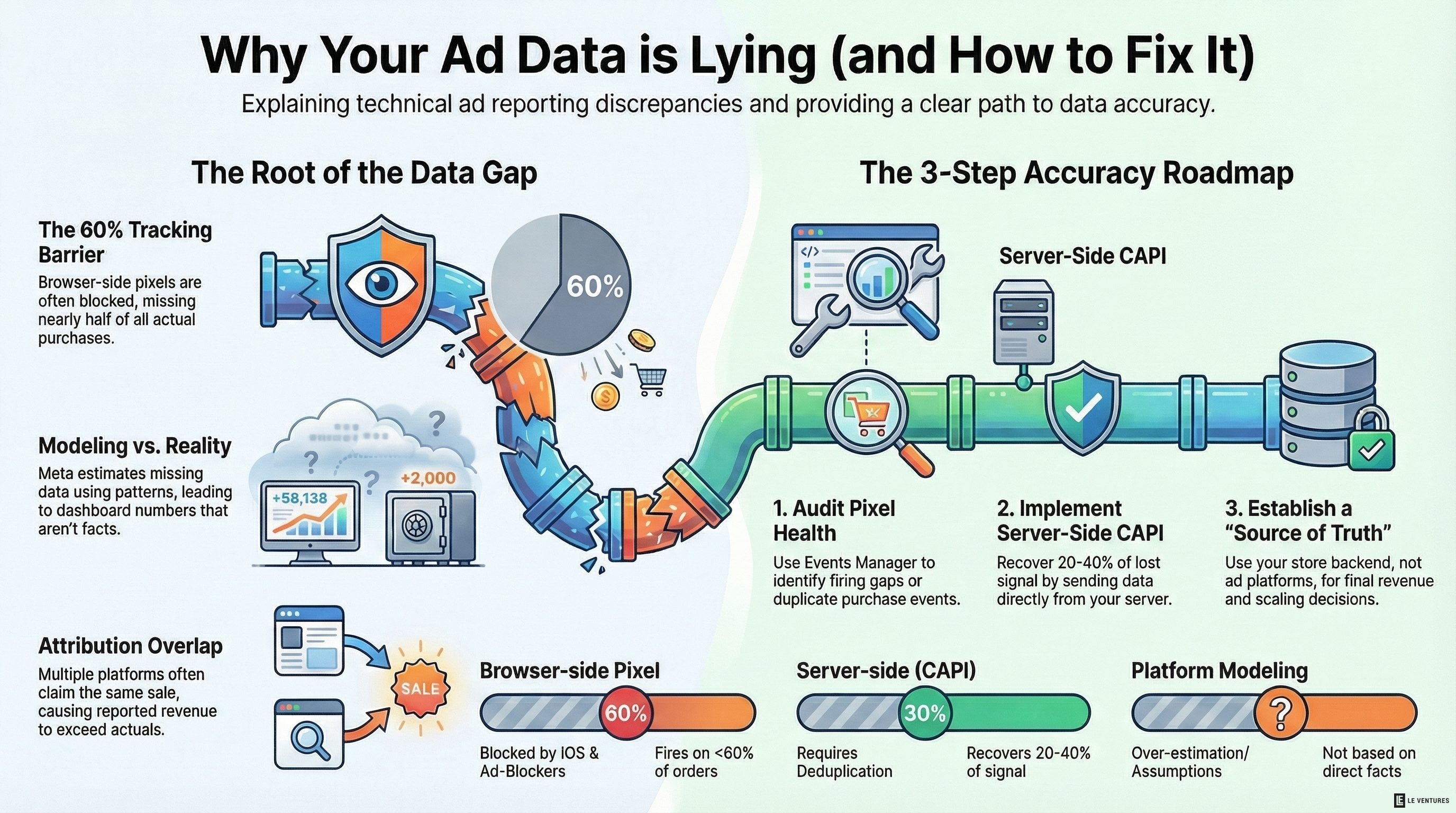
Your Meta ads dashboard says you’re getting a 3.2x ROAS. Your Shopify dashboard shows something much lower. Your team is arguing about which number is right.
They’re both wrong. Kind of.
This is one of the most common problems we see when we look at a brand’s data for the first time. The numbers don’t match, nobody fully trusts them, and decisions are being made on a best guess.
Here’s why it happens - and how to fix it.
What iOS 14.5 Actually Did
In April 2021, Apple pushed an update that required apps to ask users for permission before tracking them across other apps and websites. Most iPhone users said no.
For Meta in particular, this was a hit. A huge portion of their tracking signal - the data that told them “this person clicked your ad and then bought something” - disappeared overnight.
Meta’s response was to estimate. Their algorithm now models conversions it can’t see directly, using patterns from the conversions it can see. That’s why your Meta dashboard often shows more purchases than actually happened.
This isn’t fraud. It’s modeling. But it means the number in your Meta dashboard is an estimate, not a fact.
The Three Data Problems We See Most
Problem 1: Browser-side pixels only
Most brands still rely entirely on the Meta Pixel - a snippet of JavaScript that fires when someone loads a page. The problem: it can be blocked by browsers, ad blockers, and iOS restrictions. On many sites, the pixel fires on less than 60% of actual purchases.
Problem 2: No server-side tracking
Server-side tracking - also called Meta CAPI, or Conversions API - sends purchase data directly from your server to Meta, bypassing browser restrictions entirely. Most brands either haven’t set it up, or set it up incorrectly with duplicate events firing.
Problem 3: Attribution window mismatch
Meta might be reporting on a 7-day click, 1-day view attribution window. Google might be using last-click. Your email platform is taking credit for the same purchase. Everyone is claiming the sale.
The total attributed revenue across your platforms often adds up to 2-3x your actual revenue. That’s how you get a “3.2x ROAS” that doesn’t match your bank account.
What Broken Data Looks Like in Practice
- Your reported ROAS is consistently higher than your actual margin math suggests
- Purchases in Meta don’t match purchases in Shopify
- You can’t tell which campaigns or ads actually drove sales
- Scaling a winning campaign doesn’t produce the results you expected
- You’ve turned off ads that were actually working, because the data said otherwise
If any of those sound familiar, you almost certainly have a tracking problem.
How to Fix It
Step 1: Audit your pixel health.
Check the Meta Events Manager. Look for the purchase event - is it firing on every order? Is it firing multiple times on the same order (duplicates)? Are there gaps where it stopped firing?
Step 2: Set up server-side tracking properly.
If you’re on Shopify, Meta has a native CAPI integration. Use it. If you’re on a custom platform, this requires a developer to implement. It is worth doing - properly implemented server-side tracking typically recovers 20-40% of lost attribution signal.
Step 3: Deduplicate your events.
If you have both browser-side and server-side tracking, you need deduplication logic so Meta doesn’t count the same purchase twice. This is a common mistake after setting up CAPI.
Step 4: Pick one source of truth.
For revenue reporting, use your store backend - Shopify, WooCommerce, or whatever you’re on. Ad platforms will always claim more credit than is real. Accept that, and make decisions based on actual revenue, not platform-reported revenue.
The Cost of Bad Data
This isn’t just a reporting problem. Bad data leads to bad decisions.
You might be scaling a campaign that’s not actually working - because the model is over-attributing to it. You might be cutting campaigns that are driving real purchases - because they look bad in the dashboard when they’re actually creating assisted conversions.
Over time, poor data compounds. You optimize toward a false signal, your results don’t match expectations, and you can’t figure out why.
Fixing your tracking is the highest-leverage thing you can do before you spend more on ads. It makes every dollar you spend more effective - because your decisions are based on what’s actually happening, not an estimate.
We audit pixel health and attribution setup for every new client before we touch the ad accounts. If you want to know what your data is actually saying, start here.